THE ENABLR
THE ENABLR
Product Design
UX/UI
Accessibility
Marketplace
Accessibility
Marketplace
Figma Suite
Figma Suite
01 Brief
01 Brief
Create a global, accessibility-focused marketplace that connects People with Disabilities to genuinely inclusive services. The platform must address key challenges around trust, accessibility, and reliable information. It should offer a simple, highly accessible experience for diverse users while remaining easy for service providers to use.
Create a global, accessibility-focused marketplace that connects People with Disabilities to genuinely inclusive services. The platform must address key challenges around trust, accessibility, and reliable information. It should offer a simple, highly accessible experience for diverse users while remaining easy for service providers to use.
Product Design
UI/UI
Accessibility
Marketplace
Figma Suite
02 Research
02 Research
User Interview Goals
User Interview Goals
Understand user’s current full journey from discovery to booking service providers
Uncover pain points and highlights in the current experience
Identify user accessibility needs and preferences
Explore trust and verification concerns
Understand emotional motivations and obstacles
Understand user’s current full journey from discovery to booking service providers
Uncover pain points and highlights in the current experience
Identify user accessibility needs and preferences
Explore trust and verification concerns
Understand emotional motivations and obstacles
User Interview Findings
User Interview Findings
User interviews uncovered key needs, challenges, and motivations, highlighting opportunities to improve The Enablr experience. The key findings were:
Phone preference: Users prefer phone contact for immediacy and personal touch.
Recommendations & reviews: Trusted advice and social proof are key to building confidence.
Verification: Clear certification is essential for trust.
Trust & compassion: Genuine care strengthens loyalty.
Clear info: Transparent details ease user concerns.
User interviews uncovered key needs, challenges, and motivations, highlighting opportunities to improve The Enablr experience. The key findings were:
Phone preference: Users prefer phone contact for immediacy and personal touch.
Recommendations & reviews: Trusted advice and social proof are key to building confidence.
Verification: Clear certification is essential for trust.
Trust & compassion: Genuine care strengthens loyalty.
Clear info: Transparent details ease user concerns.
Competitor Analysis
Competitor Analysis
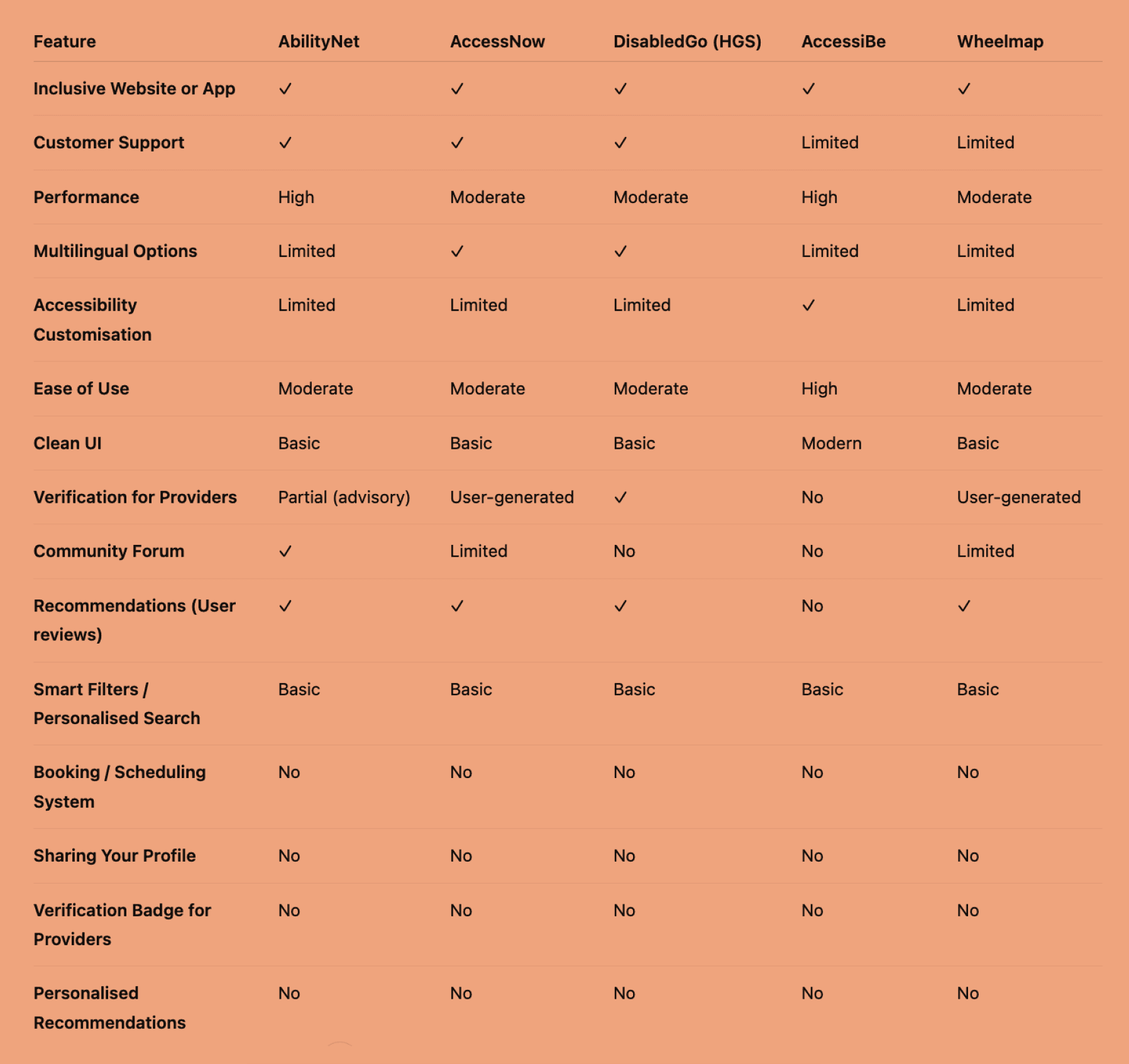
The market has fragmented options, but no comprehensive, trusted, and easy-to-use platform dedicated to accessibility needs. Existing giants serve broad audiences, but miss the nuances and trust factors crucial for disabled users.
The Enablr’s opportunity lies in curating verified, accessible, and compassionate service providers — making discovery, trust, and booking seamless. By focusing on clear verification, accessibility features, community trust, and personalised support, Enablr can fill a major gap in the marketplace.
The market has fragmented options, but no comprehensive, trusted, and easy-to-use platform dedicated to accessibility needs. Existing giants serve broad audiences, but miss the nuances and trust factors crucial for disabled users.
The Enablr’s opportunity lies in curating verified, accessible, and compassionate service providers — making discovery, trust, and booking seamless. By focusing on clear verification, accessibility features, community trust, and personalised support, Enablr can fill a major gap in the marketplace.
This analysis highlights key gaps: most competitors lack full inclusivity, provider verification, personalised search, and strong support. The Enablr can stand out by combining these features to offer a trusted, accessible, and tailored platform, filling a clear market need.
This analysis highlights key gaps: most competitors lack full inclusivity, provider verification, personalised search, and strong support. The Enablr can stand out by combining these features to offer a trusted, accessible, and tailored platform, filling a clear market need.
03 Define
03 Define
Personas
Personas
To ground my strategy in real user needs, I developed two evidence-based personas directly informed by my research.
By identifying common patterns in behaviours, emotions, goals, and frustrations, I shaped clear archetypes that represent the core users.
To ground my strategy in real user needs, I developed two evidence-based personas directly informed by my research.
By identifying common patterns in behaviours, emotions, goals, and frustrations, I shaped clear archetypes that represent the core users.

Persona 1: Claire
Persona 1: Claire
Who she is:
40, stay-at-home mum, new to the community, and caretaker of her son, who has Rheumatoid Arthritis.
Archetype:
The Caretaker
Core needs:
Easy access to verified, trustworthy service providers
Clear information on accessibility and suitability
Confidence in her choices
What drives her:
Finding the right support for her son
Building trust in service providers
Expanding opportunities for her son’s wellbeing
Who she is:
40, stay-at-home mum, new to the community, and caretaker of her son, who has Rheumatoid Arthritis.
Archetype:
The Caretaker
Core needs:
Easy access to verified, trustworthy service providers
Clear information on accessibility and suitability
Confidence in her choices
What drives her:
Finding the right support for her son
Building trust in service providers
Expanding opportunities for her son’s wellbeing

Persona 2: Tom
Persona 2: Tom
Who he is:
Who he is: 18, young adult with Rheumatoid Arthritis, seeking independence after school.
Archetype:
The Determined Independent
Core needs:
Simple, accessible platforms for booking services
Clear, upfront info on accessibility and support
Assurance of respectful, understanding providers
What drives him:
Gaining independence
Making informed, confident choices
Finding trusted services that meet his needs
Who he is:
Who he is: 18, young adult with Rheumatoid Arthritis, seeking independence after school.
Archetype:
The Determined Independent
Core needs:
Simple, accessible platforms for booking services
Clear, upfront info on accessibility and support
Assurance of respectful, understanding providers
What drives him:
Gaining independence
Making informed, confident choices
Finding trusted services that meet his needs
Experience Map
Experience Map
To fully understand the user journey, we mapped the entire process from discovery through to attending the appointment. This helped highlight key touch points, emotions, and pain points, ensuring my design supports users at every stage.
To fully understand the user journey, we mapped the entire process from discovery through to attending the appointment. This helped highlight key touch points, emotions, and pain points, ensuring my design supports users at every stage.
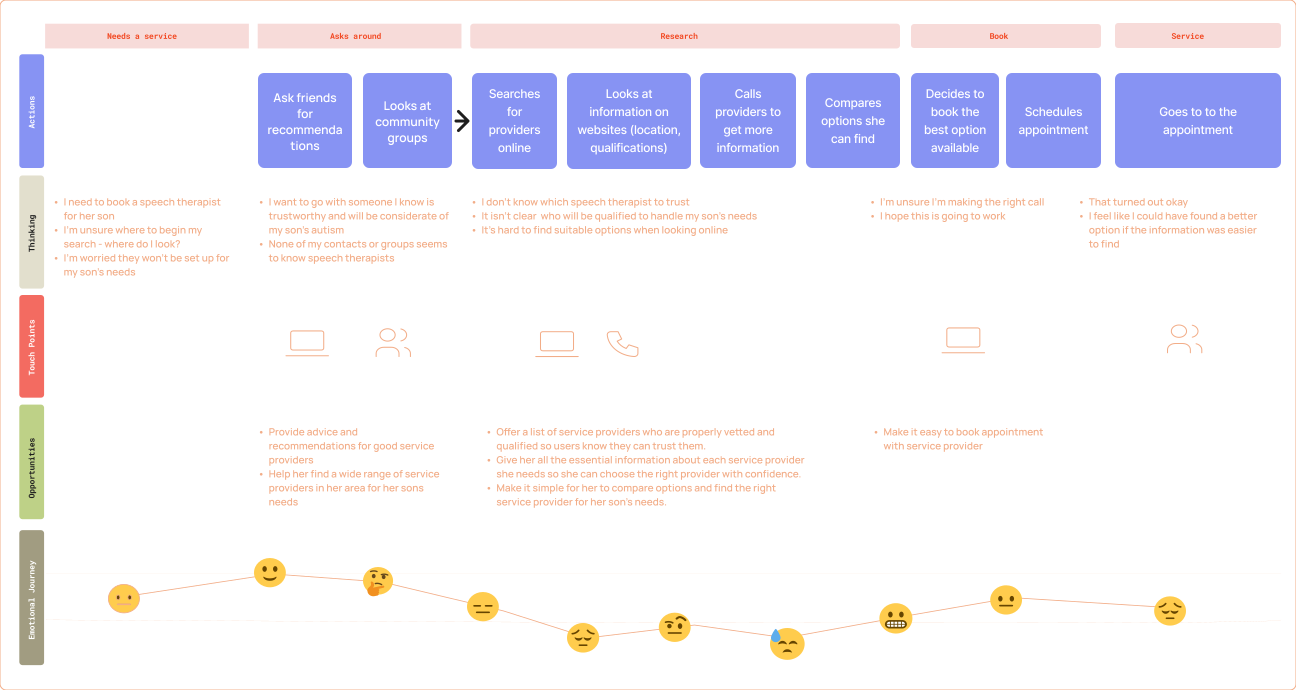
This Experience Map, together with the Personas, formed the foundation of my design decisions. They represent the real users The Enablr must serve, ensuring every feature and interaction is created with clear purpose.
Using Claire’s needs as the primary focus, I transformed these insights into concise User Stories - straightforward statements that highlight what she wants to achieve and why. These stories, grounded in both the personas and the experience map, shaped the product’s structure, helping prioritise features that address genuine challenges, foster trust, and create a supportive, accessible experience. Below are the key needs from Claire’s User Stories:
This Experience Map, together with the Personas, formed the foundation of my design decisions. They represent the real users The Enablr must serve, ensuring every feature and interaction is created with clear purpose.
Using Claire’s needs as the primary focus, I transformed these insights into concise User Stories - straightforward statements that highlight what she wants to achieve and why. These stories, grounded in both the personas and the experience map, shaped the product’s structure, helping prioritise features that address genuine challenges, foster trust, and create a supportive, accessible experience. Below are the key needs from Claire’s User Stories:
Key Needs
Key Needs
Wants a simple way to find service providers without wasting time.
Wants to confidently book providers who meet her son’s needs.
Wants assurance that providers are trustworthy and qualified.
Wants access to a wide range of services to create opportunities for her son.
Wants a simple way to find service providers without wasting time.
Wants to confidently book providers who meet her son’s needs.
Wants assurance that providers are trustworthy and qualified.
Wants access to a wide range of services to create opportunities for her son.
These clear user needs reveal key challenges we must address — forming the foundation for my Problem Statement.
These clear user needs reveal key challenges we must address — forming the foundation for my Problem Statement.
Problem Statement
Problem Statement
We believe that by creating a platform where users can easily discover verified service providers which have clear information and reviews we will achieve greater trust and confidence among Caretakers when choosing services.
We will know this to be true when users return to the platform, new users join, feedback is positive, and we see strong conversion from browsing to using services.
We believe that by creating a platform where users can easily discover verified service providers which have clear information and reviews we will achieve greater trust and confidence among Caretakers when choosing services.
We will know this to be true when users return to the platform, new users join, feedback is positive, and we see strong conversion from browsing to using services.
04 Ideate
04 Ideate
Ideation
Ideation
With a solid grasp of the users’ needs and motivations, I moved into ideation to explore a variety of solutions. Using the Crazy 8s method, I quickly sketched multiple ideas aimed at solving key pain points and reflecting the core values of users like Claire and Tom. This process helped generate creative options and focus on features that truly support their needs.
With a solid grasp of the users’ needs and motivations, I moved into ideation to explore a variety of solutions. Using the Crazy 8s method, I quickly sketched multiple ideas aimed at solving key pain points and reflecting the core values of users like Claire and Tom. This process helped generate creative options and focus on features that truly support their needs.
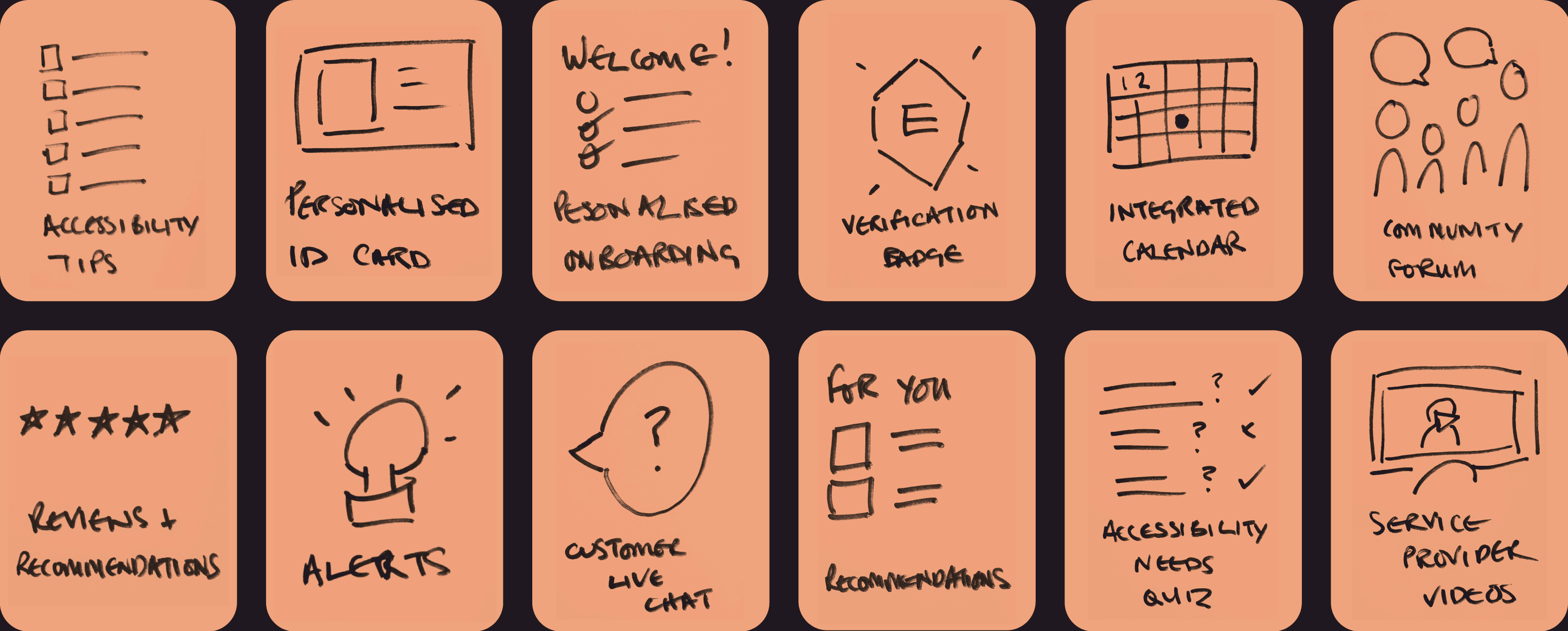
From the ideation phase, I concentrated on developing five key features to shape The Enablr platform:
From the ideation phase, I concentrated on developing five key features to shape The Enablr platform:
Personalised Onboarding
Personalised Onboarding
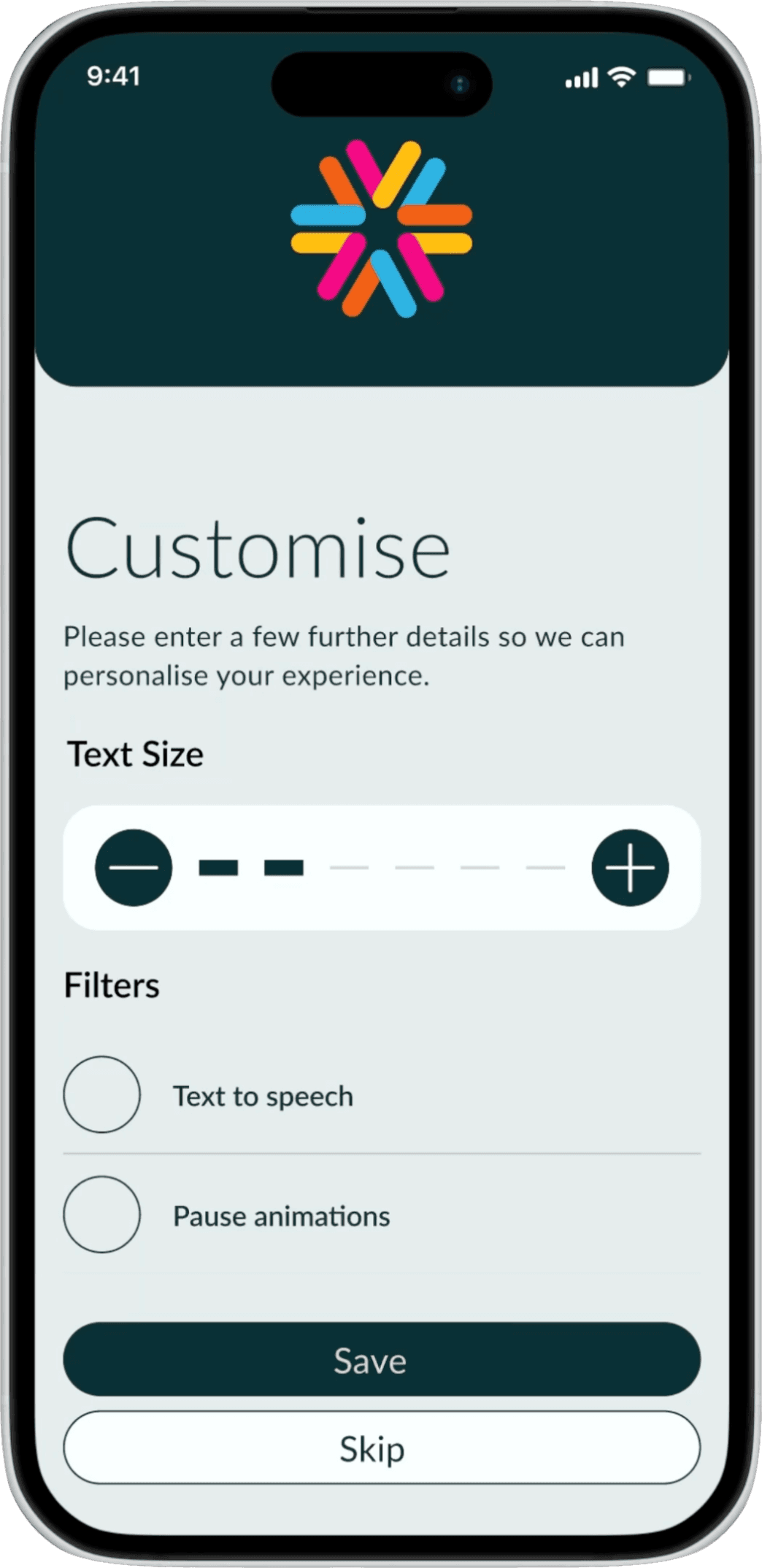
Tailoring the onboarding process to ensure the accessible ui is personable
Tailoring the onboarding process to ensure the accessible ui is personable
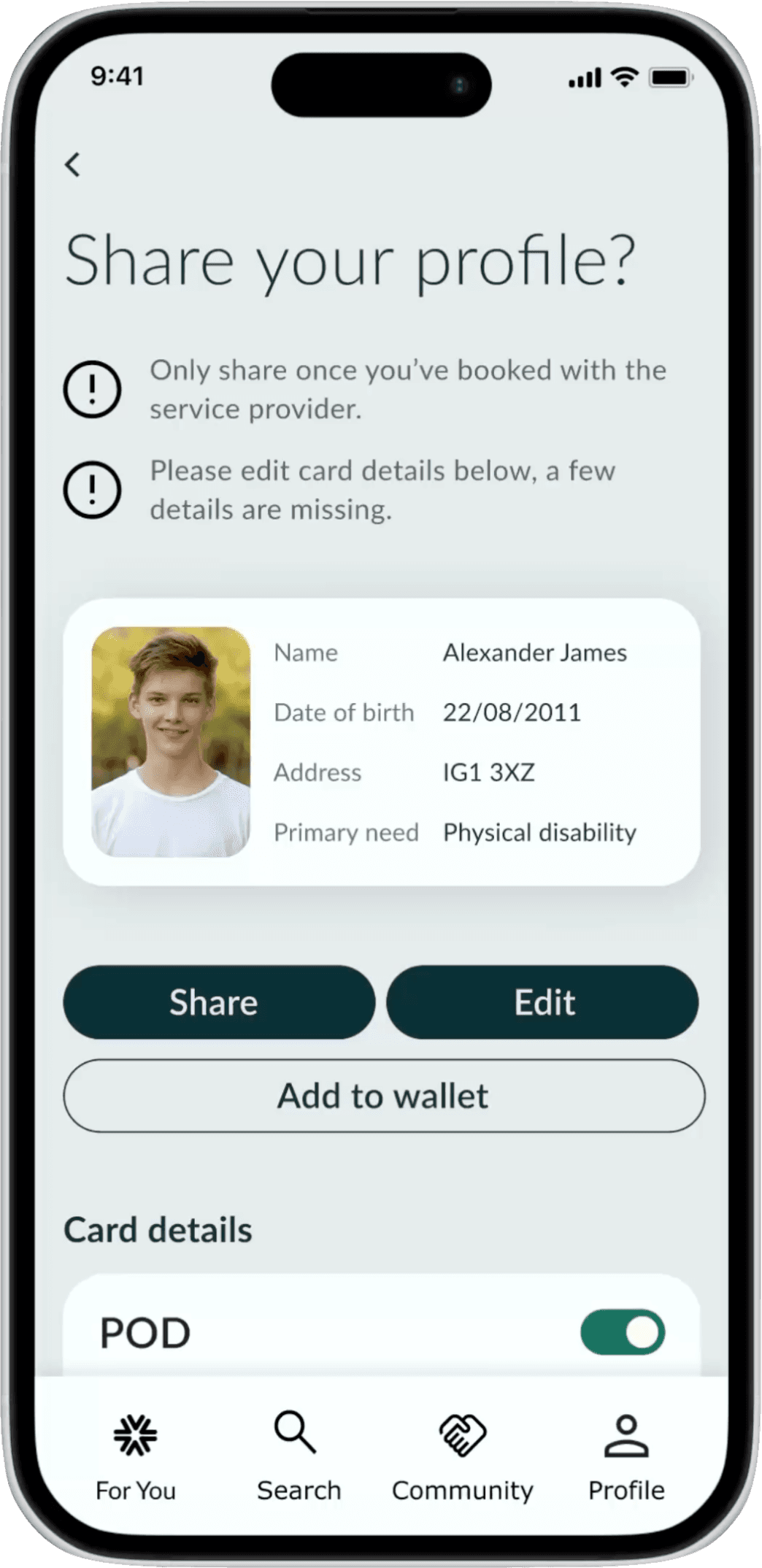
Sharing Personalised ID Card
Sharing Personalised ID Card
Enabling users to easily share their personalised profile
Enabling users to easily share their personalised profile
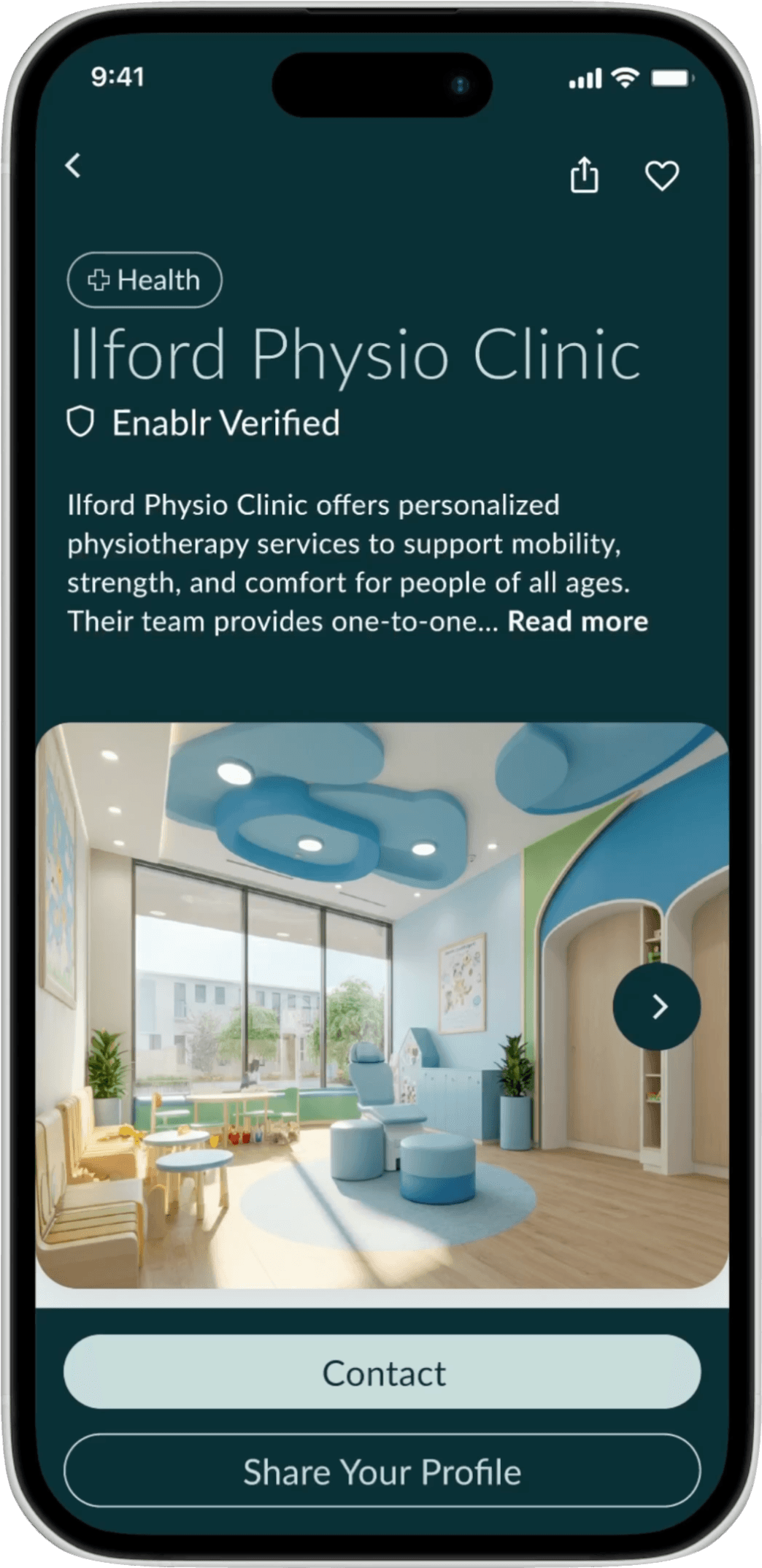
Verification Badge for Providers
Verification Badge for Providers
Displaying verified badges reassures users about the credibility and reliability
Displaying verified badges reassures users about the credibility and reliability
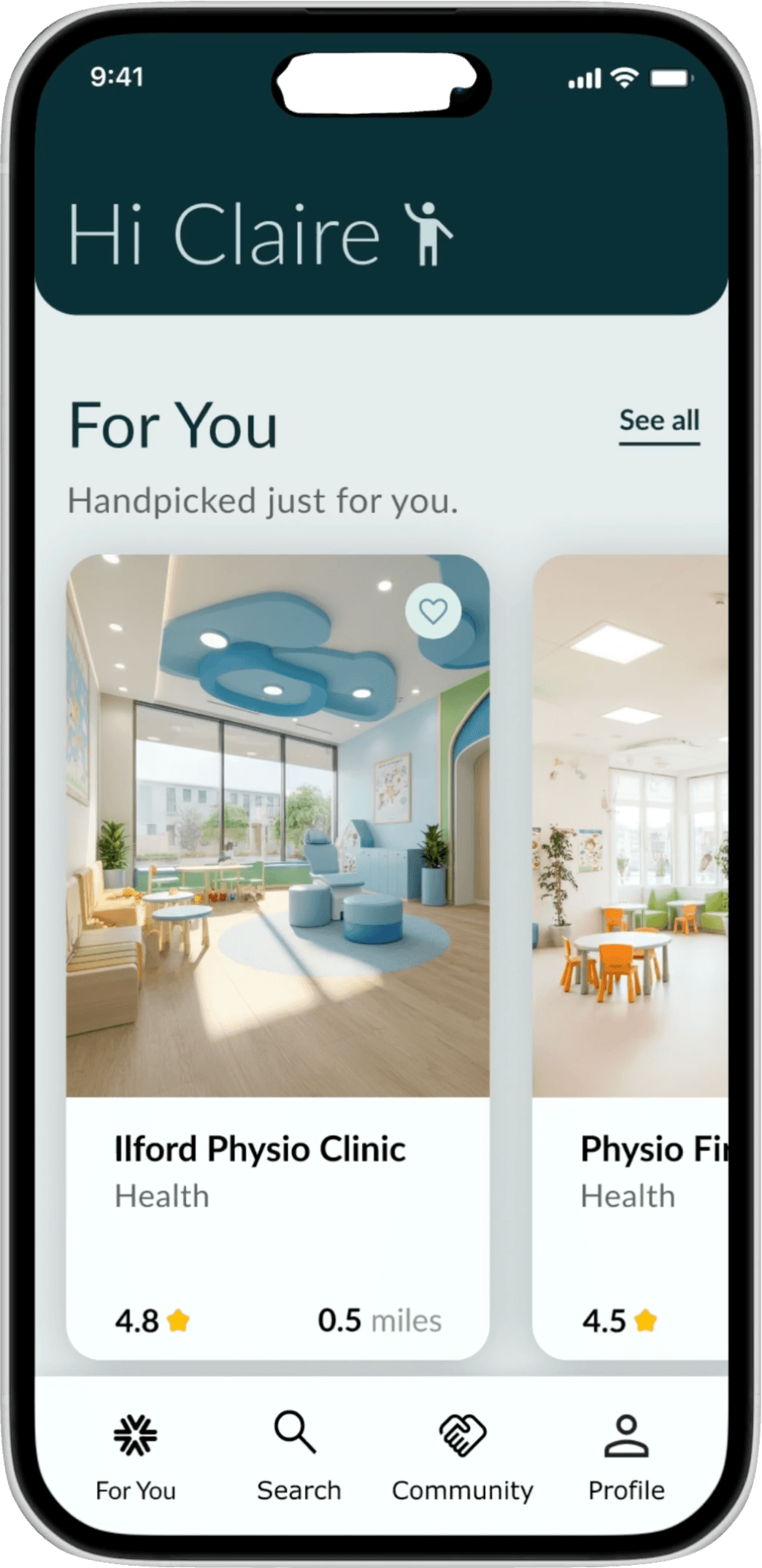
Personalised recommendations
Personalised recommendations
Tailored service suggestions helps users discover options that best fit their requirements
Tailored service suggestions helps users discover options that best fit their requirements
User Flows
User Flows
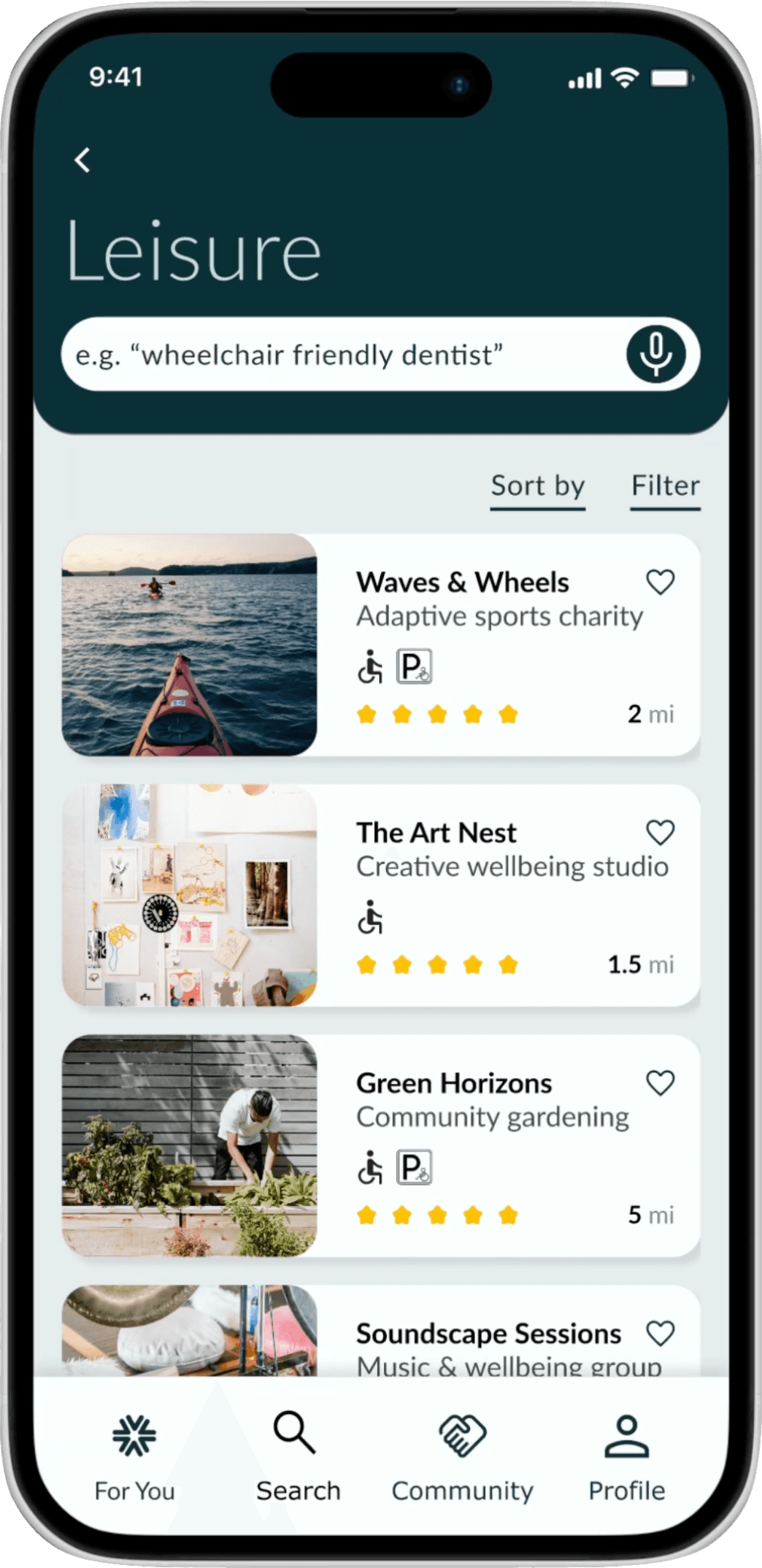
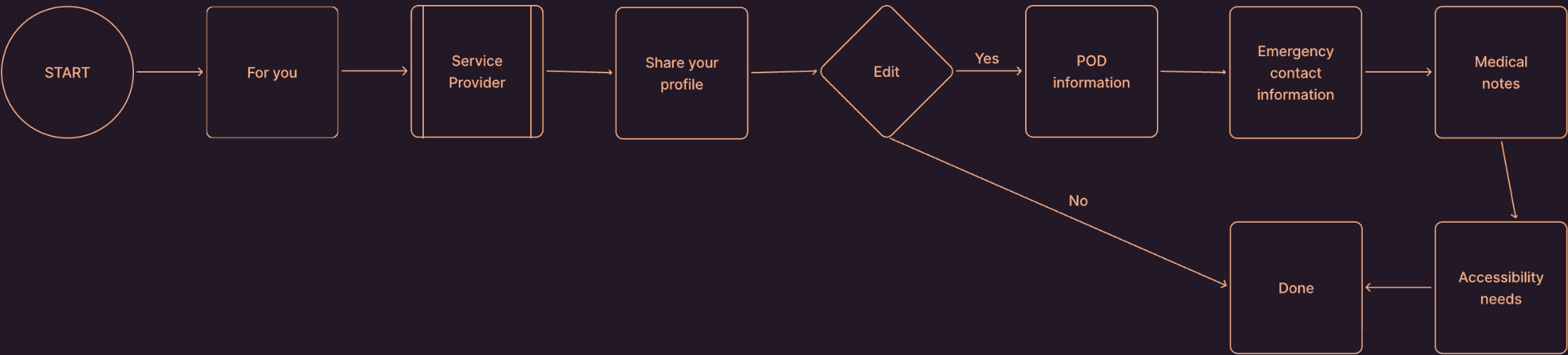
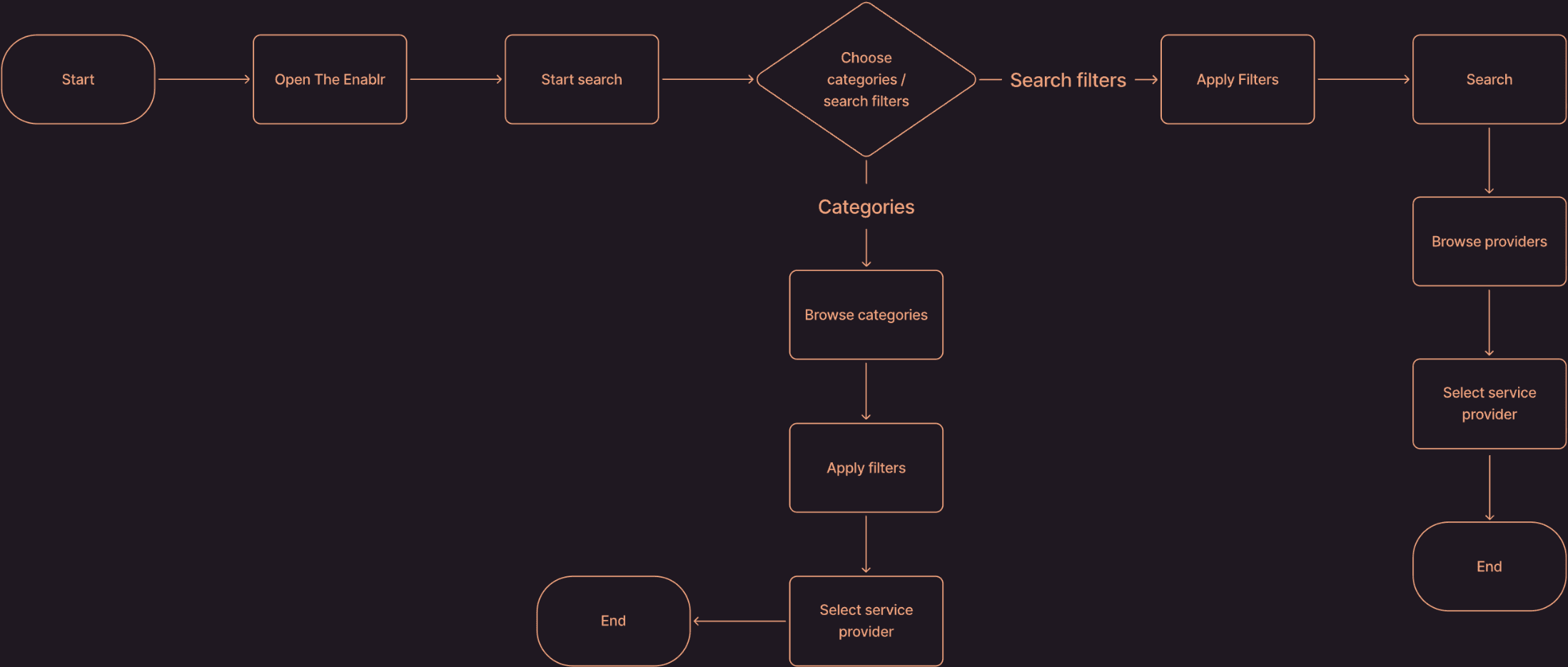
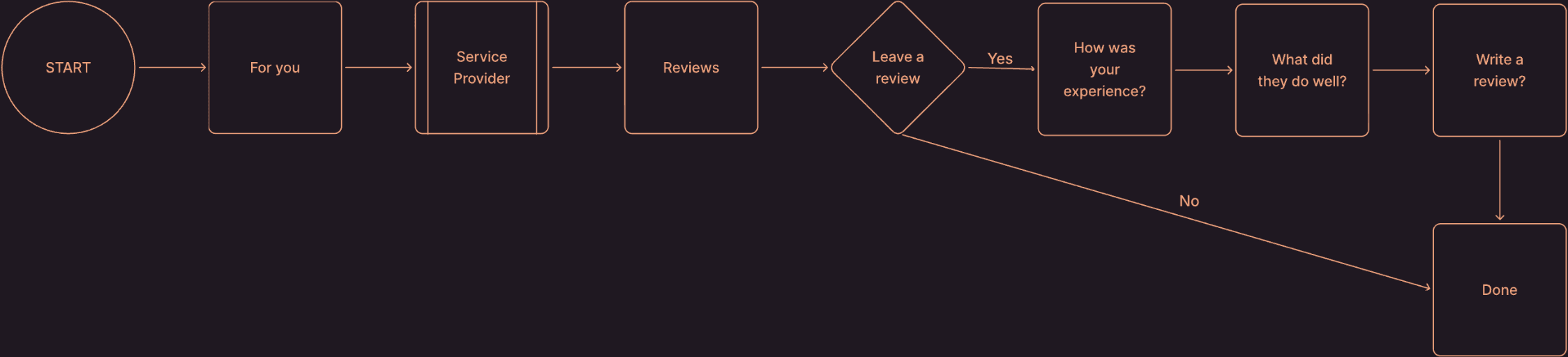
To bring these ideas to life, I created user flows for three core parts of the platform: onboarding, sharing your personalised profile, and searching/exploring service providers. These flows map out each step users take, helping ensure the experience is clear, intuitive, and meets their needs at every stage.
To bring these ideas to life, I created user flows for three core parts of the platform: onboarding, sharing your personalised profile, and searching/exploring service providers. These flows map out each step users take, helping ensure the experience is clear, intuitive, and meets their needs at every stage.
Share Your Profile
Search / Explore
Leave a Review
05 Prototype
05 Prototype
Drawing on my research and defined priorities, I moved into prototyping, bringing the user journey to life with a focus on trust, accessibility, and ease of use. These designs showcase how The Enablr delivers a smooth, intuitive experience tailored specifically to the core users’ needs.
Drawing on my research and defined priorities, I moved into prototyping, bringing the user journey to life with a focus on trust, accessibility, and ease of use. These designs showcase how The Enablr delivers a smooth, intuitive experience tailored specifically to the core users’ needs.
Accessible UI
Accessible UI
Accessibility was treated as a core product requirement — not an afterthought. Every element of the interface was intentionally crafted to support users with diverse needs:
Accessibility was treated as a core product requirement — not an afterthought. Every element of the interface was intentionally crafted to support users with diverse needs:
Minimum 16px font size for legibility across devices
Minimum 16px font size for legibility
High colour contrast to support low-vision users
High colour contrast
Clear, descriptive button labels
to reduce cognitive load
Clear, descriptive button labels
Readable typography (Lato)
44px+ touch targets
Aligned with WCAG standards
Consistent, readable
typography (Lato)
44px+ touch targets for easier interaction and motor accessibility
Fully aligned with
WCAG standards
This approach ensures Enablr remains usable, trustworthy, and welcoming to every user, without compromise.
This approach ensures Enablr remains usable, trustworthy, and welcoming to every user, without compromise.
Low-Fidelity Wireframes
Low-Fidelity Wireframes
I moved into low-fidelity wireframing to quickly translate ideas into tangible screens. At this stage, the goal wasn’t visual polish—it was clarity. I focused on mapping the structure of the experience, testing content hierarchy, and validating the essential interactions before committing to detailed design. These became the foundation for early user feedback and rapid iteration.
I moved into low-fidelity wireframing to quickly translate ideas into tangible screens. At this stage, the goal wasn’t visual polish—it was clarity. I focused on mapping the structure of the experience, testing content hierarchy, and validating the essential interactions before committing to detailed design. These became the foundation for early user feedback and rapid iteration.
9:41
9:41
9:41
Search
Search
Search
Search
Search
Search
Categories
Categories
Categories
Price
Price
Price
Location
Location
Location
Location
Location
Filters
Filters
Filters
Filters
Filters
Filters
Cancel
Cancel
Cancel
Location
Location
Location
Filters
Filters
Filters
9:41
9:41
9:41
Search
Search
Search
Categories
Categories
Categories
From
From
From
Free services
Free services
Free services
£
£
£
£
£
£
To
To
To
Location
Location
Location
Filters
Filters
Filters
Search
Search
Search
Cancel
Cancel
Cancel
9:41
9:41
9:41
Search
Search
Search
Categories
Categories
Categories
Price
Price
Price
Search location
Search location
Search location
Use current location
Use current location
Use current location
Set radius
Set radius
Set radius
Search
Search
Search
Cancel
Cancel
Cancel
Location
Location
Location
Filters
Filters
Filters
9:41
9:41
9:41
Filter
Filter
Filter
Edit search
Edit search
Edit search
Sort by
Sort by
Sort by
-------
-------
-------
-------
-------
-------
-----------------------------------
-----------------------------------
-----------------------------------
-----------------------------------
-----------------------------------
-----------------------------------
-----------------------------------
-----------------------------------
-----------------------------------
-----------------------------------
-----------------------------------
-----------------------------------
Search
Search
Search
Cancel
Cancel
Cancel
Location
Location
Location
Filters
Filters
Filters
9:41
9:41
9:41
-------
-------
-------
-------
-------
-------
-----------------------------------
-----------------------------------
-----------------------------------
-----------------------------------
-----------------------------------
-----------------------------------
-----------------------------------
-----------------------------------
-----------------------------------
-----------------------------------
-----------------------------------
-----------------------------------
-----------------------------------
-----------------------------------
-----------------------------------
-----------------------------------
-----------------------------------
-----------------------------------
Restaurants
Restaurants
Restaurants
Sort by
Sort by
Sort by
Filter
Filter
Filter
Price
Price
Price
Cuisine
Cuisine
Cuisine
Location
Location
Location
Filters
Filters
Filters
Search
Search
Search
Cancel
Cancel
Cancel
Price
Price
Price
Location
Location
Location
Filters
Filters
Filters
9:41
9:41
9:41
-------
-------
-------
-------
-------
-------
-----------------------------------
-----------------------------------
-----------------------------------
-----------------------------------
-----------------------------------
-----------------------------------
-----------------------------------
-----------------------------------
-----------------------------------
-----------------------------------
-----------------------------------
-----------------------------------
-----------------------------------
-----------------------------------
-----------------------------------
-----------------------------------
-----------------------------------
-----------------------------------
Restaurants
Restaurants
Restaurants
Sort by
Sort by
Sort by
Filter
Filter
Filter
Location
Location
Location
Filters
Filters
Filters
9:41
9:41
9:41
-------
-------
-------
-------
-------
-------
-----------------------------------
-----------------------------------
-----------------------------------
-----------------------------------
-----------------------------------
-----------------------------------
-----------------------------------
-----------------------------------
-----------------------------------
-----------------------------------
-----------------------------------
-----------------------------------
-----------------------------------
-----------------------------------
-----------------------------------
-----------------------------------
-----------------------------------
-----------------------------------
Health
Health
Health
Health
Health
Sort by
Sort by
Sort by
Filter
Filter
Filter
Price
Price
Price
Category
Category
Category
Location
Location
Location
Filters
Filters
Filters
Search
Search
Search
Cancel
Cancel
Cancel
Location
Location
Location
Filters
Filters
Filters
9:41
9:41
9:41
-------
-------
-------
-------
-------
-------
-----------------------------------
-----------------------------------
-----------------------------------
-----------------------------------
-----------------------------------
-----------------------------------
-----------------------------------
-----------------------------------
-----------------------------------
-----------------------------------
-----------------------------------
-----------------------------------
-----------------------------------
-----------------------------------
-----------------------------------
-----------------------------------
-----------------------------------
-----------------------------------
Health
Health
Health
Health
Health
Sort by
Sort by
Sort by
Filter
Filter
Filter
06 Test
06 Test
Low-fi testing quickly surfaced what wasn’t clear, intuitive, or accessible. These insights directly informed the next round of design. Here are a few of the key pieces of feedback
Low-fi testing quickly surfaced what wasn’t clear, intuitive, or accessible. These insights directly informed the next round of design. Here are a few of the key pieces of feedback
Break onboarding into smaller steps
Break onboarding into smaller steps
Ability to filter the search yourself
Ability to filter the search yourself
Need to ensure all icons are clear or clarified
Ensure all icons are clear or clarified
Must be able to go back and edit
Must be able to go back and edit
Split up buttons so larger target size
Create more space so easier to read
Option to skip full onboarding
Need ability to choose what you share
Split up buttons so larger target size
Create more space so easier to read
Need an option to skip full onboarding during sign up
Need to have the ability to pick and choose what you share
07 Iterate
07 Iterate
Based on my low-fidelity testing, I identified key areas where clarity, accessibility, and ease of navigation needed strengthening. These insights shaped the next step, refining the experience to better support users like Claire and Tom, ensuring The Enablr feels intuitive, trustworthy, and genuinely accessible.
I iterated directly on my wireframes in rapid cycles. This allowed me to quickly address issues such as unclear hierarchy, missing accessibility cues, and friction within key flows like onboarding, sharing your profile, and searching for providers. Each improvement brought the platform closer to a seamless, confidence-building experience for every user.
Key iterations:
Based on my low-fidelity testing, I identified key areas where clarity, accessibility, and ease of navigation needed strengthening. These insights shaped the next step, refining the experience to better support users like Claire and Tom, ensuring The Enablr feels intuitive, trustworthy, and genuinely accessible.
I iterated directly on my wireframes in rapid cycles. This allowed me to quickly address issues such as unclear hierarchy, missing accessibility cues, and friction within key flows like onboarding, sharing your profile, and searching for providers. Each improvement brought the platform closer to a seamless, confidence-building experience for every user.
Key iterations:
Broke onboarding into smaller, digestible steps to reduce cognitive load and support users with varying needs.
Broke onboarding into smaller, digestible steps to reduce cognitive load and support users with varying needs.
Added the ability to filter search results manually, giving users more control and reducing overwhelm.
Added the ability to filter search results manually, giving users more control and reducing overwhelm.
Amended or labelled any unclear icons to ensure every visual cue is immediately recognisable.
Amended or labelled any unclear icons to ensure every visual cue is immediately recognisable.
Introduced the option to go back and edit details at any stage, supporting flexibility and reducing anxiety.
Introduced the option to go back and edit details at any stage, supporting flexibility and reducing anxiety.
Separated clustered buttons and increased target sizes to meet accessibility touch standards.
Separated clustered buttons and increased target sizes to meet accessibility touch standards.
Expanded spacing and improved layout readability for a calmer, more accessible interface.
Expanded spacing and improved layout readability for a calmer, more accessible interface.
Added a “Skip for now” option during onboarding, so users can get started without committing to the full setup.
Added a “Skip for now” option during onboarding, so users can get started without committing to the full setup.
Enabled users to choose exactly what personal information they share, reinforcing trust and autonomy.
Enabled users to choose exactly what personal information they share, reinforcing trust and autonomy.
08 Deliver
08 Deliver
These high-fidelity prototypes represent the culmination of extensive research, user insights, and thoughtful iteration. They clearly demonstrate how the design solves key challenges for The Enablr’s users while advancing the platform’s mission to deliver an accessible, reliable, and empowering experience. This work lays a solid foundation for the platform’s next stage of development.
These high-fidelity prototypes represent the culmination of extensive research, user insights, and thoughtful iteration. They clearly demonstrate how the design solves key challenges for The Enablr’s users while advancing the platform’s mission to deliver an accessible, reliable, and empowering experience. This work lays a solid foundation for the platform’s next stage of development.